
The Best Amazon Keyword Research Tools in 2026 (Agency-Tested)
An honest comparison of the Amazon keyword research tools we actually run on client accounts — what each one is genuinely good at, where the volume estimates break, and the free data source most brands ignore.
Every list of "best Amazon keyword research tools" is written by someone with an affiliate link. So here is ours, written by an agency that pays full price for several of these subscriptions every month and uses them on real accounts, where being wrong costs a client money.
Two things worth saying before the tools.
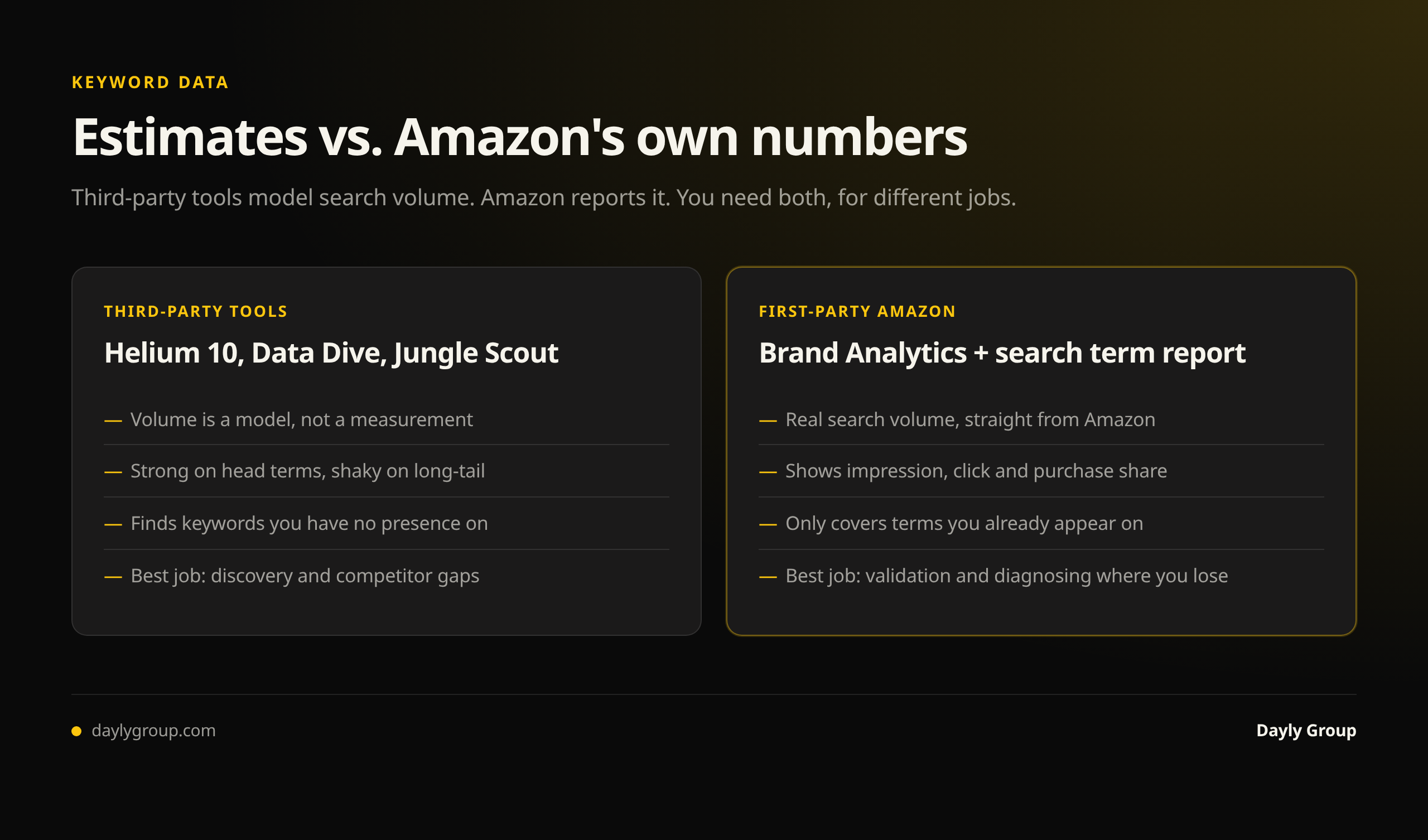
First, no third-party tool knows Amazon search volume. Amazon does not publish it. Every number you see in Helium 10, Jungle Scout or anywhere else is a model — reverse-engineered from rank tracking, click-share data and inference. Good models, in some cases. Still models. Treat them as relative signals, not absolute truth.
Second, the most accurate Amazon keyword data available to you is free, comes from Amazon, and most brands never open it. We will get to that.
The short answer
If you sell on Amazon and want one paid tool: Helium 10, for Cerebro. If you already have Helium 10 and want the one that changes how you work: Data Dive. If you want the most accurate keyword data that exists: Amazon Brand Analytics, which you already pay for by being brand registered.
Now the detail.
1. Helium 10 (Cerebro and Magnet) — the default, and deservedly so
What it's for: reverse-ASIN research. You give Cerebro a competitor's ASIN and it returns every keyword that ASIN ranks or advertises for, with estimated volume, its organic position, and whether it's sponsored.
Why it matters: reverse-ASIN is the highest-leverage move in Amazon keyword research, and Cerebro does it better than anything else. You are not guessing what shoppers search — you are reading the keyword set of a product that is already winning. Run Cerebro on your five closest competitors, find the terms where all five rank and you don't, and you have your listing and PPC roadmap in about twenty minutes.
The feature that earns the subscription: Cerebro's competitor-count filter. Set it to "ranking in the top 20 for 4+ of these ASINs" and you get the keywords your category consensus agrees matter — which filters out the noise that makes big keyword exports useless.
Where it's weak: the search volume estimates are directional, and they are noticeably shakier on low-volume long-tail terms and in smaller categories. Magnet (keyword expansion from a seed) is fine but not differentiated. And the suite is enormous — most sellers use maybe 15% of what they pay for.
Honest verdict: if you buy one tool, buy this one. Use it for reverse-ASIN and rank tracking, and ignore most of the rest.
2. Data Dive — the one that changed how we work
What it's for: comparing many competitors at once and turning keyword data into a decision, rather than a spreadsheet.
Why it matters: most tools answer "what keywords exist?" Data Dive answers "where is the gap?" You load ten competitor ASINs plus your own, and it segments the keyword universe by relevance and by who owns it — so you immediately see which terms the whole category ranks for and you don't, which terms only one competitor owns, and which terms you rank for but are underperforming on. Its listing-optimization workflow then builds a keyword-weighted title and bullet structure from that data instead of from opinion.
Where it's weak: it's expensive, and it assumes you already know what you're doing. There is no gentle on-ramp. If you're managing one product, it is overkill and you will not get the value out of it.
Honest verdict: for agencies and multi-ASIN brands doing serious listing work, it is the most useful keyword tool on the market. For a single-product seller, skip it.
3. Amazon Brand Analytics — the free data everyone ignores
What it's for: actual Amazon search data. Not a model.
If you're brand registered, Seller Central gives you Brand Analytics, and inside it the Search Query Performance report. For any keyword, it shows the real search volume, and then the funnel: impressions, clicks, add-to-carts and purchases — both for the whole market and for your brand's share of each stage.
Nothing else comes close, because it isn't an estimate. It's Amazon's own numbers.
What makes it operationally different from every paid tool is that it tells you where you lose, not just what to target. Same keyword, three very different problems:
- Low impression share — you're not indexed or not bidding enough. A visibility problem.
- Good impression share, low click share — you're being seen and passed over. That's your main image, price, review count or badge. A merchandising problem, and no keyword work will fix it.
- Good click share, low purchase share — shoppers arrive and leave. That's your listing content, reviews or price. A conversion problem.
Most keyword strategies fail because a brand chases more impressions on a term where it's already being seen and rejected. Search Query Performance is the only report that shows you the difference.
Where it's weak: brand registry required, the UI is slow, data lags by a few days, and it only covers keywords you have presence on — so it's a diagnostic and refinement tool, not a discovery tool. Use Cerebro to find candidates, then Brand Analytics to judge them.
4. Amazon's search term report — the cheapest research subscription in e-commerce
Not a keyword tool. Better than one.
Your advertising search term report shows the exact queries shoppers typed before clicking your ads, with spend and — critically — orders attached. This is first-party conversion data on your own product. A third-party tool tells you a keyword has volume; the search term report tells you that keyword makes you money.
The practical move: run a small always-on auto campaign purely as a discovery engine. It buys you a continuous feed of real converting queries for the price of a modest daily budget. Then promote converting terms into your listing and into exact-match campaigns. We covered that loop in our Amazon PPC audit checklist.
The best free Amazon keyword research tools
Most of the search demand for keyword tools is for free ones, and the honest answer is that the two best free sources aren't tools at all — they're reports Amazon already gives you. Ranked by how much they'll actually tell you:
1. Brand Analytics — Search Query Performance (free with Brand Registry). Real search volume plus impression, click and purchase share. Nothing paid is more accurate. Covered in detail above.
2. Your advertising search term report (free with any ad spend). Exact queries that produced clicks and orders on your own products. First-party conversion data.
3. Amazon's own search bar. Type your head term and read the autocomplete suggestions — those are real, popular queries ordered roughly by demand. Then check the "Related searches" row on the results page. Crude, free, and directionally reliable.
4. Helium 10's free tier. A limited number of Cerebro and Magnet lookups per month. Genuinely useful if you only need occasional reverse-ASIN checks, and enough to decide whether the paid plan is worth it.
5. SellerSprite and similar free tiers. Small daily allowances of reverse-ASIN lookups. Fine for spot checks.
What to skip: Google Keyword Planner. It's free and excellent — for Google. Amazon shoppers search differently and with far more buying intent, so Google volumes will mislead you on both demand and phrasing. Also be wary of free "Amazon keyword tool" sites that are lead capture for a paid product; the data is usually a stale scrape.
If your budget is genuinely zero, the sequence is: autocomplete for discovery, Brand Analytics to validate, search term report to confirm what converts. That combination beats a paid subscription used carelessly.
5. Jungle Scout — better for product research than keyword research
Jungle Scout's reputation was built on product and demand research, and that's still where it's strongest. Keyword Scout is competent — decent volume estimates, useful historical trend view, clean interface — but if keyword work is your priority, Cerebro's reverse-ASIN depth and filtering beat it.
Buy it if: you're validating new products or tracking category demand and want keyword data included. Skip it if: you already have Helium 10 and want deeper keyword capability.
6. Keepa — not a keyword tool, and you should still have it
Keepa tracks price, Buy Box, sales rank and offer history. No keyword features to speak of.
It belongs in this list because keyword research goes wrong when you misread competitive context. A competitor ranking above you for your head term might be doing it with a price cut two weeks ago, a coupon, or a rank spike from a promotion. Keepa shows you that in five seconds and stops you from rebuilding a listing to solve a problem that was actually a temporary discount.
7. SellerSprite and the rest
SellerSprite is a genuine budget alternative — reverse-ASIN, volume estimates, competitor tracking at meaningfully lower cost, and unusually good coverage of the Chinese seller landscape. The data is less consistent than Helium 10's and the interface is rougher.
Beyond that, most tools in this space are the same reverse-ASIN engine with different chrome. Adding a fourth is almost never what's holding an account back.
What we actually pay for
Helium 10 for reverse-ASIN and rank tracking. Data Dive for multi-competitor gap analysis and listing builds. Brand Analytics and the search term report on every account we touch, because they're free and more accurate than anything we could buy. Keepa for competitive context.
That's it. Four things, and two of them cost nothing.
The order of operations matters more than the tool
Every account we audit that has a keyword problem has it because of sequence, not software. The tools were fine. They were used in the wrong order — usually starting with a giant keyword export and never validating it against what actually converts.
The sequence that works:
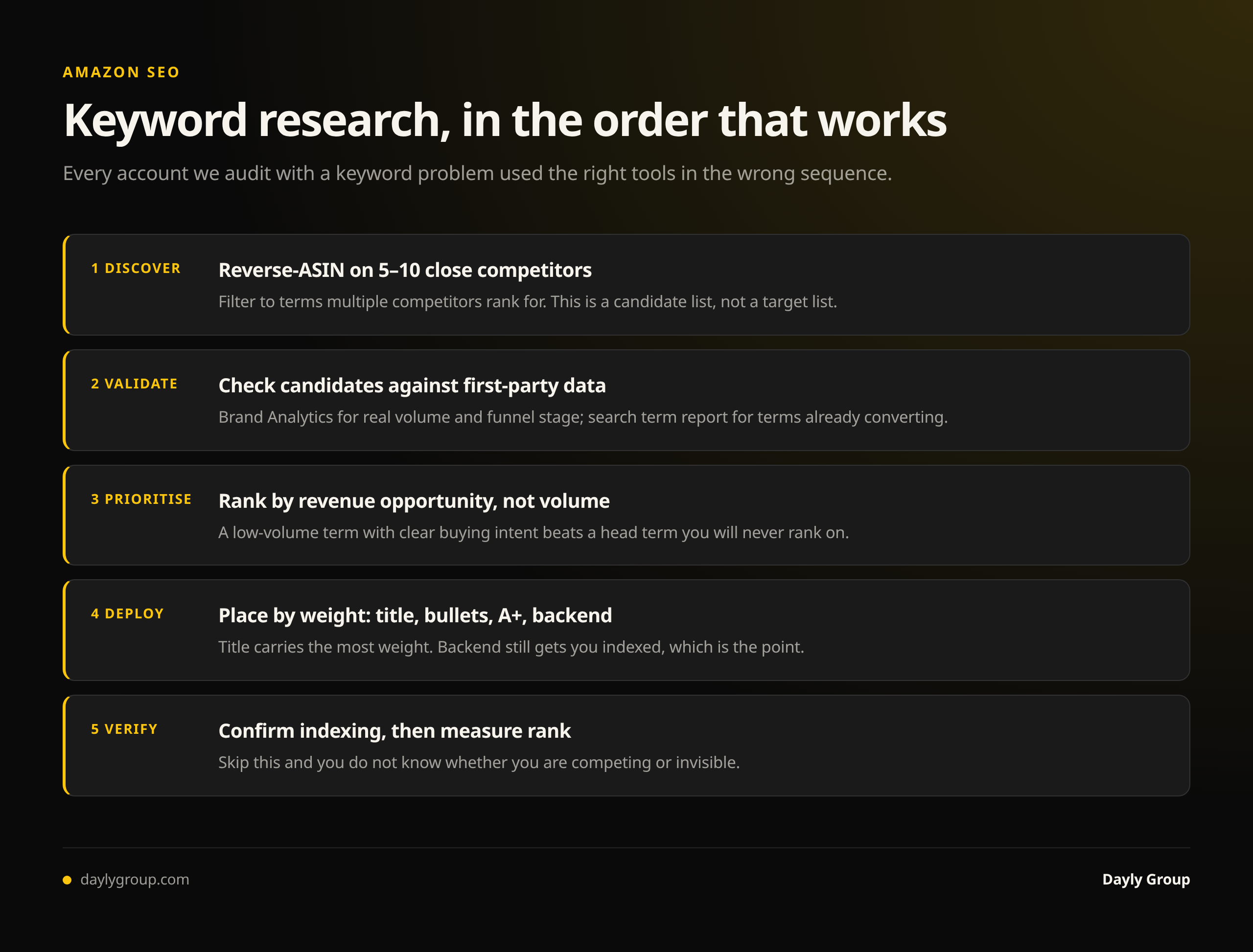
- Discover with reverse-ASIN. Five to ten close competitors in Cerebro, filtered to terms multiple competitors rank for. This is your candidate list, not your target list.
- Validate against first-party data. Check candidates in Brand Analytics for real volume and where you lose the funnel. Cross-check your search term report for terms already converting.
- Prioritize by revenue opportunity, not volume. A term with a tenth of the volume and clear buying intent beats a head term you'll never rank on.
- Deploy into the listing by weight — title carries the most, then bullets, then A+ and backend. See our listing optimization guide for placement rules.
- Verify indexing, then measure rank movement. If you don't check indexing, you don't know whether you're competing or invisible. The organic rank guide covers this.
Skip step 2 and you will build a listing around keywords with volume and no intent. That's the most common and most expensive keyword mistake on Amazon, and no subscription prevents it.
What no tool will do for you
A keyword tool can tell you a term exists, roughly how big it is, and who ranks for it. It cannot tell you whether you can win it, whether the traffic converts for your price point, or whether your real problem is a main image rather than a keyword.
Those are judgment calls, and they're where accounts are actually won or lost. We've grown brands past $100M in Amazon revenue and the keyword tooling was never the differentiator — the sequence and the honesty about what the data was really saying were.
FAQ
Q: What is the best free Amazon keyword research tool? A: Amazon Brand Analytics, specifically the Search Query Performance report, if you're brand registered. It's real Amazon search data rather than an estimate, and it shows where in the funnel you lose each keyword. Your advertising search term report is the second-best free source, because it ties queries to actual orders. Neither costs extra.
Q: Is Helium 10 or Jungle Scout better for keyword research? A: Helium 10, because of Cerebro's reverse-ASIN depth and its multi-competitor filters. Jungle Scout is the better tool for product and demand research. If keywords are the priority, choose Helium 10; if you're validating new products, Jungle Scout earns its place.
Q: How accurate is Amazon keyword search volume? A: Third-party volume is always an estimate — Amazon doesn't publish search volume, so every tool models it. Estimates are reasonably reliable for high-volume head terms and get unreliable on long-tail and in smaller categories. Use them to rank keywords against each other, then confirm the ones that matter in Brand Analytics.
Q: How many keywords should I target for one product? A: Fewer than most exports suggest. Ten to fifteen primary terms you intend to rank for, supported by a wider set of long-tail terms in backend and PPC. A listing built to serve fifty keywords equally serves none of them well.
Q: Do I still need a paid keyword tool if I have Brand Analytics? A: Yes, for discovery. Brand Analytics only reports on keywords you already have presence on, so it can't tell you what you're missing. Reverse-ASIN tools find the candidates; Brand Analytics judges them. The two are complementary, not alternatives.
Q: Are free Amazon keyword tools good enough? A: For most brands, yes — if you use the right ones. Brand Analytics Search Query Performance and your advertising search term report are free, first-party, and more accurate than any paid estimate. What free tools can't do well is broad discovery across competitors you have no presence against; that's where a paid reverse-ASIN tool earns its fee. Avoid Google Keyword Planner for Amazon research, since Google search behavior and volumes don't transfer.
Keep reading
Book a free Gap Analysis. We'll tell you what's leaking, what's scaling, and where the next 30% lives.
Book a Gap Analysis →