
Amazon SEO: How Organic Rank Actually Works (And How to Improve It)
Keyword indexing, search term reports, backend keywords and the algorithm signals that decide page one. The complete organic rank guide for DTC brands on Amazon.
Every brand we audit is paying for traffic it should be getting for free.
Not because their ads are bad — usually because their organic rank is weak, so PPC is doing the work organic should be doing. The tell is simple: high ad-attributed revenue share, flat total revenue. You're renting your own keywords.
Amazon SEO fixes that. It is also the most misunderstood discipline on the platform, mostly because people import Google habits that don't apply. Amazon isn't ranking pages by authority and backlinks. It's ranking products by the probability that a given search results in a purchase.
Once you internalize that, everything else follows.
What Amazon's Algorithm Is Actually Optimizing For
Amazon is a revenue-per-search machine. Its ranking system exists to put the product most likely to sell in front of the shopper who just typed a query.
That gives you three categories of lever:
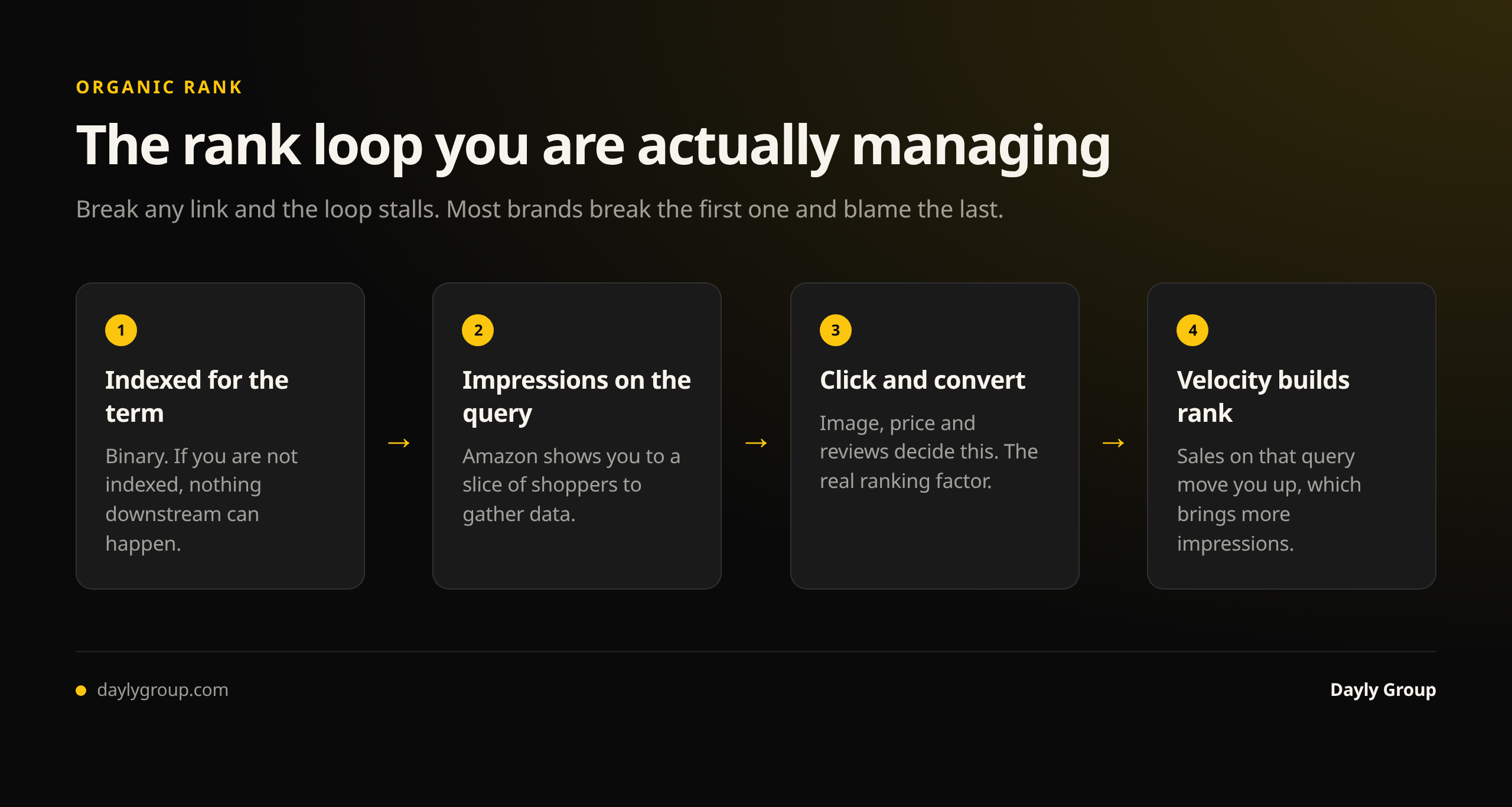
Relevance — does the algorithm believe your product is an answer to this query at all? This is indexing, and it's binary. If you're not indexed for a keyword, no amount of budget will make you rank for it.
Performance — of the products it considers relevant, which ones convert and sell? This is conversion rate, sales velocity, and click-through rate from the search results page.
Trust — reviews, ratings, seller performance, in-stock rate, and price competitiveness.
Most brands obsess over the first bucket (stuffing keywords) and neglect the second (making the listing convert). Relevance gets you into the auction. Performance is what wins it.
Keyword Indexing: The Step Everyone Skips
Indexing means Amazon has associated your ASIN with a keyword and will consider showing you for it. It is the precondition for everything.
How to check it. Search "your exact keyword" + your ASIN in the Amazon search bar. If your product appears, you're indexed. If nothing comes back, you're not — and you're invisible for that term regardless of how good your product is.
How to fix it. A keyword needs to exist somewhere in your listing's crawlable fields: title, bullets, description or A+ content, and backend search terms. Title placement carries the most weight, backend the least — but backend still gets you indexed, which is the point.
Do this systematically. Build a list of your 50 priority keywords, check indexing on all of them, and fix the gaps. In nearly every audit we run, a brand is missing indexing on high-volume terms it assumed it was ranking for. That's free revenue sitting behind a five-minute check.
One nuance worth knowing: indexing is not permanent. Change your title, and you can lose indexing on a term that was only present there. Always re-check after a listing edit.
Search Term Reports: Your Only Real Keyword Research
Third-party keyword tools estimate. Your search term report reports.
Inside your advertising console, the search term report shows the actual queries shoppers typed before clicking your ads, plus impressions, clicks, spend, and — critically — orders. This is first-party data about what converts for your product, not what has volume in your category.
How to read it for SEO purposes:
- High orders, not in your title. These are your highest-value additions. A term that converts in PPC will convert organically. Promote it into your title or lead bullet.
- High clicks, zero orders. Wrong-intent traffic. Do not put these in your listing — you'll attract browsers who don't buy and drag down your conversion rate.
- High impressions, low click-through rate. Relevance is fine, but your main image, price or review count isn't competitive. This is a merchandising problem, not a keyword one.
- Converting long-tail phrases. Often the fastest rank wins available. Less competition, clearer intent, and they compound into the head term over time.
Pull this report monthly. Then run automatic campaigns specifically as a keyword discovery engine — a small always-on auto budget is the cheapest research subscription in e-commerce.
Backend Keywords: What to Include and What to Skip
Backend search terms are the hidden field in Seller Central (Keywords → Search Terms). Shoppers never see them; the algorithm does. You get roughly 250 bytes, and Amazon ignores everything past the limit — so waste here is real waste.
Include:
- Synonyms and alternate names for your product
- Common misspellings shoppers actually type
- Use cases and occasions ("gift", "camping", "postpartum")
- Materials, colors and sizes not already in the title
- Spanish-language terms if relevant to your category
- Terms you found converting in your search term report but couldn't fit into the title
Skip:
- Anything already in your title or bullets — repetition is wasted bytes, not extra weight
- Your own brand name (you already rank for it)
- Competitor brand names (against Amazon's terms and a suspension risk)
- Commas, semicolons or repeated words — use single spaces
- Subjective claims: "best", "cheapest", "#1"
- Plurals when you have the singular, and vice versa; Amazon handles both
Write it as one lowercase, space-separated string with no punctuation. No filler articles. Every byte should be a term you'd genuinely want to be found for.
Conversion Rate: The Ranking Factor Disguised as a Design Problem
Here's the part that separates real Amazon SEO from keyword hygiene: the fastest way to improve organic rank is usually to improve conversion rate.
If two products are both indexed and both getting impressions, the one that converts better wins the placement — and then wins more impressions, which produces more sales, which reinforces the rank. It's a compounding loop, and the entry point is the listing itself.
The levers, in order of impact:
- Main image. It controls click-through rate from search. Small changes here move more revenue than anything else on the page.
- Price relative to category. Amazon is explicitly price-sensitive in its ranking.
- Review count and rating. Under 20 reviews, everything is harder.
- Title clarity. Front-load the primary keyword and the actual product identity. A title that ranks but confuses shoppers is a net loss.
- A+ content and brand story. Meaningful lift on considered purchases.
- In-stock rate. Going out of stock resets velocity and surrenders rank you paid for.
We go deeper on this in the listing optimization guide — but the point stands: you cannot separate Amazon SEO from conversion work. They're the same project.
How PPC and Organic Rank Feed Each Other
They aren't separate channels. Ad-driven sales contribute to the same velocity and conversion signals that drive organic rank, which means a deliberate PPC push on a target keyword is a legitimate organic rank strategy.
The sequence we use to take a keyword:
- Confirm indexing on the term
- Verify the listing converts at or above category benchmark
- Push aggressive PPC on that exact-match keyword to build velocity
- Watch organic rank climb over two to four weeks
- Once organic holds page one, taper the bid and let organic carry the volume
- Redeploy the freed budget to the next keyword
Done repeatedly, this is how TACoS trends down while revenue grows — the definition of healthy Amazon scaling. If you're not tracking ACoS against TACoS, you can't see this working.
A 30-Day Amazon SEO Sprint
Week 1 — Diagnose. Build the 50-keyword priority list. Check indexing on every one. Pull 90 days of search term reports. Benchmark your conversion rate against category.
Week 2 — Fix relevance. Rewrite titles to front-load converting head terms. Rebuild bullets around use cases and search language. Rewrite backend search terms from scratch using the include/skip rules above. Re-verify indexing after every edit.
Week 3 — Fix conversion. New main image if click-through rate is below category norm. A+ content live. Address the top three objections visible in your negative reviews.
Week 4 — Push and measure. Concentrated PPC on five target keywords. Track rank daily on those terms. Hold everything else steady so you can attribute the movement.
Then repeat with the next keyword set. Amazon SEO is not a project you finish; it's an operating rhythm. Competitors change titles, categories shift, and the algorithm keeps re-scoring.
Frequently Asked Questions
Q: How long does Amazon SEO take to show results? A: Indexing fixes can show within 48–72 hours of a listing update. Rank movement from conversion and velocity improvements typically takes two to four weeks to become clear, and compounds over two to three months. Anyone promising page one in a week is describing a PPC placement, not organic rank.
Q: What's the difference between Amazon SEO and Google SEO? A: Google ranks pages by relevance and authority for an informational query. Amazon ranks products by purchase probability for a commercial query. Backlinks and domain authority are irrelevant on Amazon; conversion rate, sales velocity and reviews are decisive. Keyword stuffing that would only look spammy on Google will actively lose you sales on Amazon.
Q: Do backend keywords still matter? A: Yes, but less than most sellers think. They get you indexed for terms you can't fit naturally into visible copy — that's their job. They carry far less ranking weight than the title, and they won't rescue a listing that doesn't convert.
Q: Can I rank organically without running PPC? A: On a new listing, it's very slow. PPC is the practical way to generate the initial velocity and conversion data the algorithm needs. Once organic rank is established on a keyword, you can taper spend on it and hold position.
Q: How do I know if my listing is indexed for a keyword? A: Search the exact keyword in quotes plus your ASIN in Amazon's search bar. If your product appears, you're indexed. Re-check after every listing edit — changing a title can silently drop indexing.
If you want to know exactly which keywords you're missing indexing on and what your realistic organic upside is, book a 45-minute gap analysis. We'll pull your search term data, check indexing on your priority terms, and show you where the free revenue is.
Search is also changing shape: see optimizing for Rufus and AI search for what conversational shopping changes about listing copy.
Keep reading
Book a free Gap Analysis. We'll tell you what's leaking, what's scaling, and where the next 30% lives.
Book a Gap Analysis →