
GMV Max Net Sales vs Gross Revenue: How Billing, Refunds and ROI Targets Differ
TikTok Shop's GMV Max now lists Maximize Net Sales next to Gross Revenue. Ad cost comes out of the order after the purchase, with no daily budget, and it is refunded if the order is returned or canceled. Here is how the billing works, how to convert your ROI target, and when to stay on Gross Revenue.
On this page
TikTok Shop now lets GMV Max work like an affiliate commission. You pay when the order lands. If it comes back, so does your ad cost.
That is the short version of Maximize Net Sales. The longer version matters, because the same ROI number now means two different things depending on which goal you pick.
This post covers what the goal is, how billing differs from Gross Revenue, the worked math, how to convert your ROI target, when to switch and when to stay, how to reconcile the charges in Seller Center, and one related setting for Subscribe & Save. How GMV Max works in general is in TikTok Shop GMV Max explained. If your campaign is not spending, start with why GMV Max is not spending your budget. Whether dashboard ROI counts orders you would have had anyway is in is GMV Max ROI counting organic sales.
What is Maximize Net Sales?
Maximize Net Sales is an optimization goal for Shop Ads. In TikTok Ads Manager, when you create a GMV Max campaign, you choose between two goals under Optimization goal:
Net Sales.
Ad cost is only paid from an order's GMV when a purchase occurs. It accounts for refunds automatically.Gross Revenue.
Ad cost is deducted when your ads are shown. This is the original GMV Max goal.
TikTok defines the terms this way. Gross Revenue is the total amount paid for your products, minus platform sales taxes and product discounts. Net Sales is Gross Revenue minus refunds. Net Sales ROI is the ROI calculated on Net Sales, and it is the target you set.
Both Product GMV Max and LIVE GMV Max can use it. TikTok's setup guide is dated March 2026 and the About page was updated in November 2026, so the goal has been documented for a while. What changes now is that more brands will see it next to the goal they already use.
How does billing differ from Gross Revenue?
| Gross Revenue | Net Sales | |
|---|---|---|
| When ad cost is charged | When your ads are shown | From the order's value after a purchase occurs |
| Daily budget | You set one | None. You set only an ROI target |
| If an order is returned or canceled | Ad cost was deducted at delivery, as the goal is defined | The corresponding ad cost is refunded to your billing account |
| Where you see the charge per order | Ads Manager | Seller Center, Finance, Transaction, as the Shop ads Commission fee |
TikTok describes the Net Sales benefits as refund-aware billing and a simpler workflow: no daily budget and no separate ROI protection settings to manage.
What does a Net Sales order cost, in numbers?
TikTok's setup guide gives the rule: ad cost equals GMV times one divided by your Net Sales target ROI. Its own example: set the target to 5 and you pay $20 for every $100 you earn.
The About page gives the fuller formula: Net Sales cost equals (what the customer actually paid plus any platform subsidy) times (1 divided by ROI) times (1 plus the tax rate). With no subsidy and a zero applicable tax rate, that reduces to the simple version.
Here is the same $100 order, shown both ways. These are EXAMPLE numbers: a target of 5, no platform subsidy, no applicable tax.
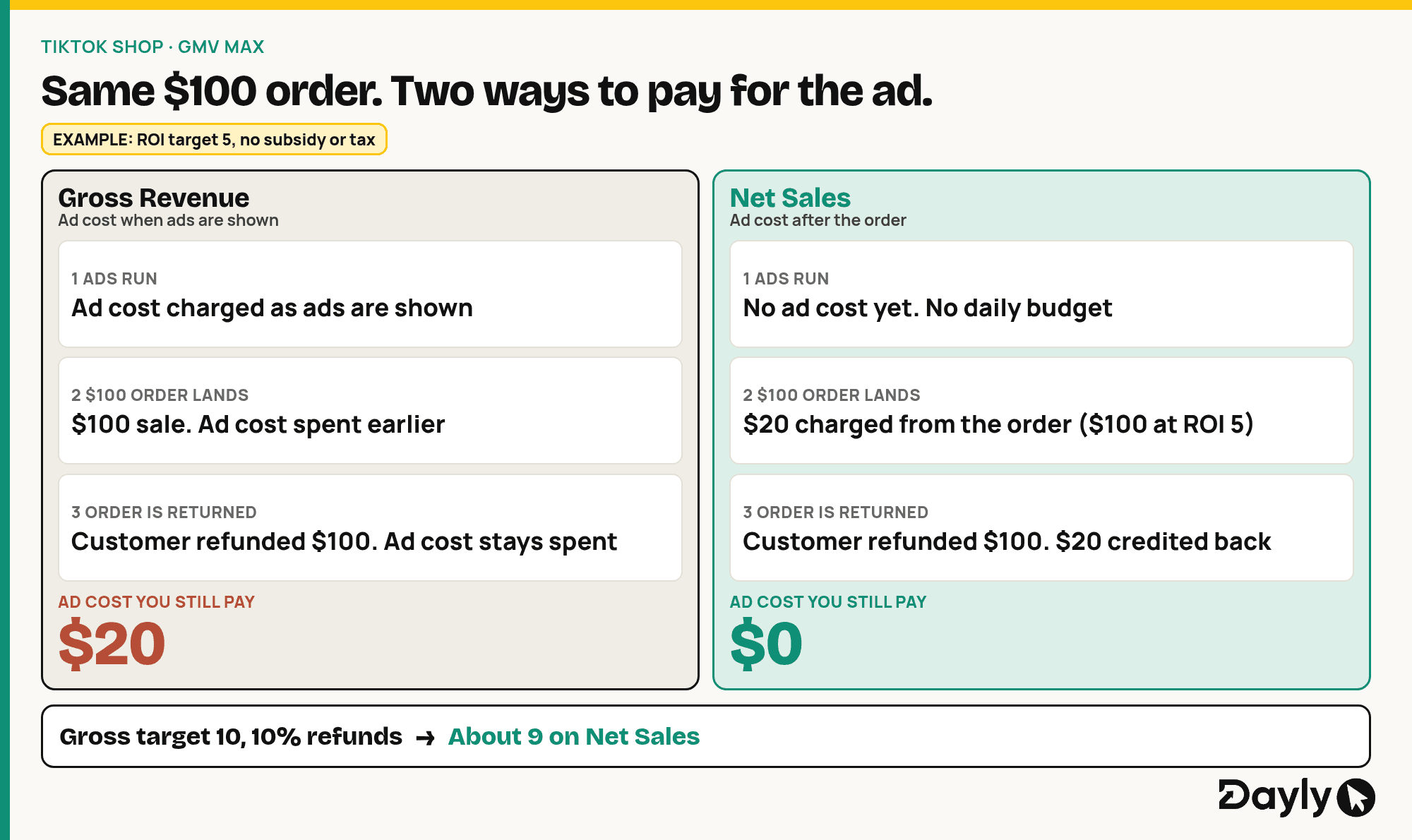
Two things to read from it:
- At a target of 5, 20% of every order's revenue goes to ads. That is true of any ROI of 5, but with Net Sales it is a charge on each order, not a daily budget burn.
- The return changes the ad bill. On Net Sales, a returned order takes its ad cost with it. You still lose the product, the shipping and any other fees on that order. Net Sales takes the refund off your ad bill. It does not take it off your margin.
How do you convert your ROI target?
Your old gross target will not carry over, because a Net Sales target accounts for refunds. TikTok's best-practices guide gives the example: if your previous Gross target was 10 and your refund rate is 10%, set your new Net Sales target to 9 to get a similar scale and performance.
The direction is the point. Because refunds are taken out of the revenue the target is measured on, the same spend needs a lower number. A reasonable first conversion is your gross target times one minus your refund rate. At 10 and 10%, that is 10 times 0.90, which is 9. Treat that as a starting point, hold it long enough to read results, and adjust in small steps. Do not change the target and other settings on the same day, as in the not-spending triage.
Then check it against your margin. Break-even ROI is one divided by your contribution margin before ads, as covered in GMV Max explained. Illustrative: at a 30% margin before ads, break-even is 3.33, and a target of 5 means 20% of revenue goes to ads, leaving 10 points of margin. Use your own numbers. If you are not sure what your margin is, the fees guide walks the stack.
When should you switch, and when should you stay on Gross Revenue?
TikTok does not publish a switching rule, so this is our read, not TikTok policy.
Net Sales is worth testing when:
- Returns or cancellations are a real share of your orders, and you want ad cost to follow the orders that stick.
- You are tired of managing a daily budget on a product whose demand swings.
- You have a margin worked out and know what share of an order you can give to ads.
Staying on Gross Revenue makes sense when:
- You need a hard daily spend cap, for a launch, a promotion window or a tight cash week. Net Sales has no daily budget, so there is no daily cap to set. Spend follows orders.
- Net Sales does not appear in your account. Check Optimization goal when you create a campaign. If the option is not there, it is not offered to you yet.
- You are mid-test on something else. Do not change the goal while you are also changing creative, price or stock. You will not know what moved.
If you do test, run one product or one campaign first, keep the old campaign's goal, dates and spend on file, and compare after refunds, not before.
What are the trade-offs?
Less control over pacing.
With no daily budget you cannot cap a day's spend. A strong sales day costs more in ad dollars, because the cost scales with orders.The target has to be reset.
Your gross number does not transfer. Plan the conversion and a review window.Refund-aware, not margin-aware.
The ad cost comes back on a return. Product cost, shipping and other fees do not.A different invoice line.
Net Sales charges show up as a Shop ads Commission fee in Seller Center, not only in Ads Manager. Tell whoever reconciles your books.
How do you set it up?
- In TikTok Ads Manager, open the GMV Max tab and click Create GMV Max ads.
- Choose Product GMV Max or LIVE GMV Max.
- Under Optimization goal, select Net Sales.
- Set your Net Sales ROI target.
- Finish the ad group and ad settings, including schedule, targeting and creatives, then click Publish.
TikTok says ad costs are then deducted from the revenue of the orders your campaign generates. You can watch performance in the Ads Manager dashboard.
How do you reconcile Net Sales in Seller Center?
Two places hold the numbers, and they should agree for the same period.
In Ads Manager, the campaign list. TikTok added three columns for this: Optimization Goal (Net Sales or Gross Revenue), Refunded Ad Cost (ad costs for returned and canceled orders that were refunded in the period) and Refund GMV (the total value of refunded orders in the period).
In Seller Center, Finance, then Transaction. Each order shows a Shop ads Commission fee. That fee is the ad cost.
A simple routine:
- Save the optimization goal, dates, currency and spend for the campaign you are testing.
- Pull Refunded Ad Cost and Refund GMV for the period from the campaign list.
- In Finance, Transaction, find the Shop ads Commission fee on the same orders.
- Match each refund to its original order in your margin sheet. Count each ad charge and each credit once.
- Compare order volume, revenue after refunds, ad cost and contribution after ads against your last period. Note any price, creative or stock change in the same window.
- Mark orders that have not settled yet and check them again later. Order-level views are for analysis. See Order Analysis for tracing GMV to orders and creators.
What is SNS Optimization Mode?
It is a separate setting for Product GMV Max, and it matters if you sell on Subscribe & Save. When it is on, recurring Subscribe & Save repurchases are excluded from gross revenue and ROI calculations, so GMV Max optimizes toward new purchases and first subscription orders. TikTok offers it to selected advertisers in the United States, on newly created Product GMV Max campaigns. You turn it on at campaign creation with the toggle Exclude subscription orders from revenue.
Because gross revenue can get smaller, delivery and ad cost may fall if you keep the same ROI goal. If renewals are a big share of your revenue, TikTok says you may need to lower the goal and adjust it step by step. A made-up example: $600 of one-time purchases, $200 of first subscription orders, $200 of renewals and $200 of ad cost is an ROI of 5 with renewals counted and 4 with them excluded.
TikTok's SNS page is about gross revenue and ROI. It does not say how the mode works together with the Net Sales goal, so check what your account allows before you plan to combine them.
What should you confirm before you rely on any of this?
- Whether Net Sales shows under Optimization goal in your account.
- The billing terms Ads Manager shows when you create the campaign.
- Whether the same attribution questions apply. TikTok's Net Sales pages do not say whether organic orders on promoted products count, as covered for Gross Revenue in the organic-sales post. Test, do not assume.
- How platform subsidies and the applicable tax rate change the charge on your orders, using the formula above.
FAQ
Q: What is Maximize Net Sales in GMV Max? A: An optimization goal for TikTok Shop GMV Max, listed next to Gross Revenue. Ad cost is paid from an order's value after the purchase, there is no daily budget, and you set a Net Sales ROI target. If an order is returned or canceled, the corresponding ad cost is refunded to your billing account.
Q: How much does a Net Sales order cost in ad spend? A: The order's revenue divided by your Net Sales ROI target. TikTok's example: a target of 5 means $20 for every $100 earned. The full formula also includes platform subsidy and tax rate.
Q: Is there a daily budget with Net Sales? A: No. TikTok says you do not set a daily budget or manage ROI protection settings. You set an ROI target.
Q: What Net Sales ROI target should I use if my Gross target was 10? A: TikTok's example: with a gross target of 10 and a 10% refund rate, set a Net Sales target of 9 for similar scale and performance. Start there and adjust in small steps.
Q: Where do I see Net Sales charges in Seller Center? A: Finance, then Transaction. The Shop ads Commission fee on each order is the ad cost.
Q: Do I get the ad cost back when an order is returned? A: On Net Sales, TikTok says the corresponding ad cost is automatically refunded to your billing account when an order is returned or canceled. The campaign list shows it as Refunded Ad Cost.
Q: Should I switch from Gross Revenue to Net Sales? A: TikTok gives no rule. Test it on one product, convert your target using your refund rate, keep the old goal's numbers on file, and compare after refunds. Stay on Gross Revenue if you need a daily spend cap or if Net Sales is not offered on your account.
Q: What is SNS Optimization Mode? A: An optional Product GMV Max setting for selected US advertisers that excludes recurring Subscribe & Save orders from gross revenue and ROI. TikTok does not say how it works with Net Sales.
If you want your margin, refund rate and GMV Max target worked out before you switch goals, book a TikTok Shop roadmap call or request the free TikTok Shop Gap Report. It shows where your shop stands against top sellers in your category, and the first moves we would rank.
References
- About Maximize Net Sales for Shop Ads - TikTok Ads Help, last updated November 2026. Definitions, benefits, refund-aware billing, the full cost formula.
- How to set up a Shop ads campaign with Maximize Net Sales - TikTok Ads Help, last updated March 2026. Setup steps, the two goals, the $20 per $100 example at a target of 5.
- Best practices for maximizing net sales - TikTok Ads Help, last updated April 2026. The 10 to 9 target conversion, new campaign-list metrics, Shop ads Commission fee in Seller Center Finance.
- About SNS Optimization Mode for GMV Max - TikTok Ads Help, last updated August 2026. Subscribe & Save exclusion, availability, what changes.
Keep reading
- TikTok ShopShould a Brand Post on Its Own TikTok Shop Account or Leave It to Affiliates?November 27, 2026 · 8 min read
- TikTok ShopHow Do I Get Spark Codes From TikTok Shop Affiliates for GMV Max?November 26, 2026 · 8 min read
- TikTok ShopWhy Is TikTok Shop Holding My Payout? Reserves and Settlement ExplainedNovember 25, 2026 · 9 min read