
On Amazon, individuals can purchase vast products with just a few clicks. Brands in this expansive marketplace seek effective strategies to distinguish themselves. A valuable tool for achieving this is A+ Content, a secret weapon for enhancing online product sales.
For those already engaged in selling through Amazon Seller Central, A+ Content might ring a bell, but its full potential for your business might have yet to be fully explored.
In a nutshell, Amazon A+ Content provides a tried-and-true method for:
- Increasing organic product traffic.
- Building yourself as a brand on this marketplace.
- Converting visitors into customers.
For any Amazon seller, ignoring A+ Content would be a mistake. This article aims to explain everything you need to know about creating and optimizing Amazon A+ content.
What is Amazon A+ Content?
Amazon A+ Content, formerly known as Enhanced Brand Content (EBC) for sellers, is a feature that allows Amazon brand owners to glorify their product descriptions with rich texts and images.
A+ Content is designed to help brands tell a more comprehensive and compelling product story, which can lead to higher conversion rates, increased traffic, and more sales.
NOTE: This premium content feature is available to vendors and sellers who have been approved as brand owners through Amazon’s Brand Registry process.
Here are the key components of A+ Content:
- Detailed Images and Text: Brands can use high-quality images, detailed text descriptions, and custom layouts to showcase their products more effectively than with standard product descriptions. You can even lay out your product’s different use cases, benefits, and storytelling.
- Modules: Amazon provides a variety of modules for A+ Content creation, including comparison charts, bullet points, image carousels, and more. These modules help brands customize the look and feel of their product pages for more personalized user-experience.
- Branding: It allows for adding a brand story, including a logo, a custom headline, and a narrative that provides background about the brand, its values, and its mission.
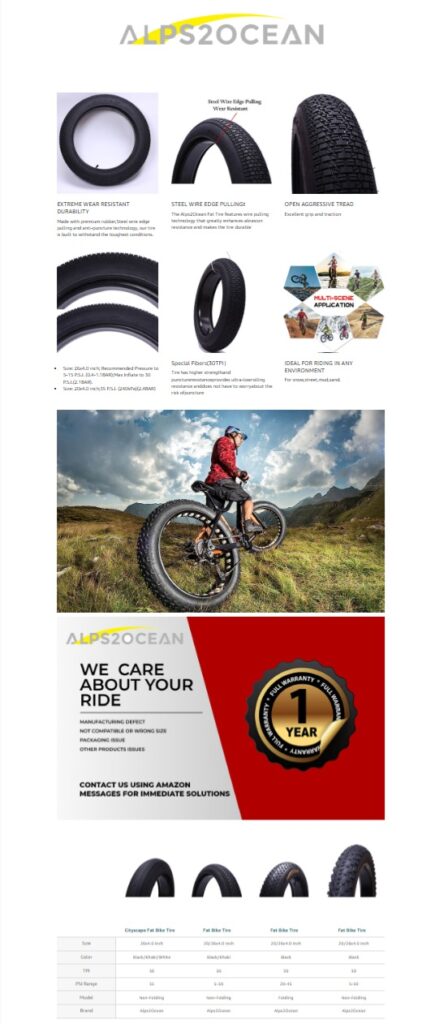
Here is an example:
What is Premium Amazon A+ Content?
Brand-registered sellers can access an upgraded version of A+ content called Premium A+. Sometimes referred to as A++, this premium offering includes extra interactive features, bigger images, improved comparison charts, carousels, and video modules.
Amazon says:
Premium A+ content improves conversion rate by 20% over standard A+
It’s a significant advancement compared to the basic A+ Content, offering sellers a more engaging and enhanced experience.
Enhancing product listings through Amazon A+ Content significantly boosts the appeal and visibility for both Amazon FBA and Dropshipping models, driving higher conversion rates and sales success on the platform.
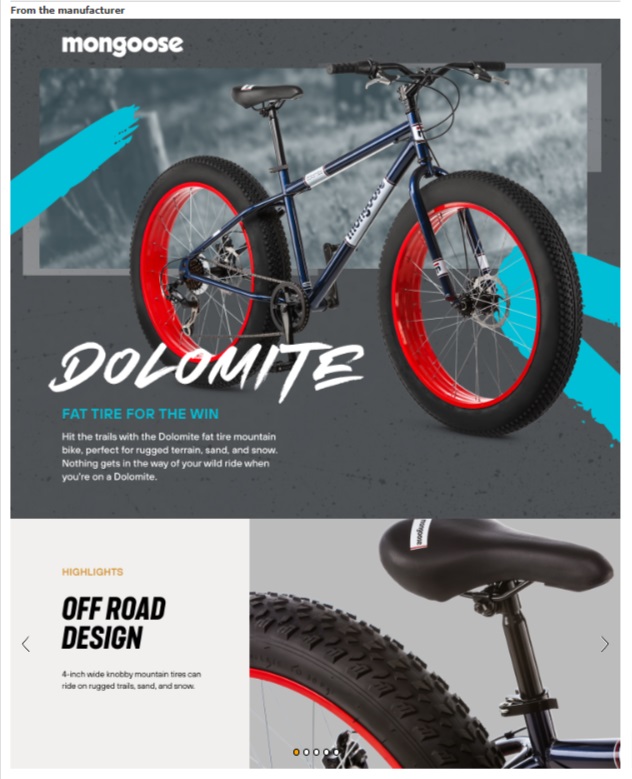
Features of Premium A+ Content
Premium A+ Content offers several additional features compared to Basic A+ Content. These include:
- Connection with the Alexa System so customers can research your product anytime, anywhere.
- Voice-friendly and mobile-friendly product pages that make scrolling and digesting content more seamless.
- Interactive content, such as video loops and carousel modules, allows customers to see multiple angles of a product quickly.
- Robust, clickable FAQs that educate and address common concerns and, therefore, remove any barriers to purchase.
- There are 16 interactive content modules with HD images (12 Amazon A+ Content templates).
- Integrated 720p videos up to three minutes in length.
BUT,
Compared to FREE A+ content, Amazon charges a substantial amount for A++ content. Therefore, it’s suitable for brands with significant revenue. For sellers, A+ content is just more than enough.
What Are The Eligibility Criteria For Premium A+?
For individuals to qualify for the use of Premium A+ Content, you need to fulfill specific requirements:
- All ASINs owned by the brand in their catalog must feature a published A+ Brand Story.
- A minimum of 5 A+ Content project submissions must be in the “Approved” status within the last 12 months.
A+ vs. Premium Content
| A+ Content Type | Text & Images | Image Size | Comparison Chart | Allowable Modules on the Detail Page | Module Selection | Video & Hotspot | Navigation Carousel |
| Basic A+ | – | 970 x 300 | – | 5 | 14 | – | – |
| Premium A+ | – | 1464 x 600 | – | 7 | 19 | – | – |
How do You Create Amazon A+ Content in 6 Steps?
After finishing the registration process, individuals can start creating their A+ content.
Step 1
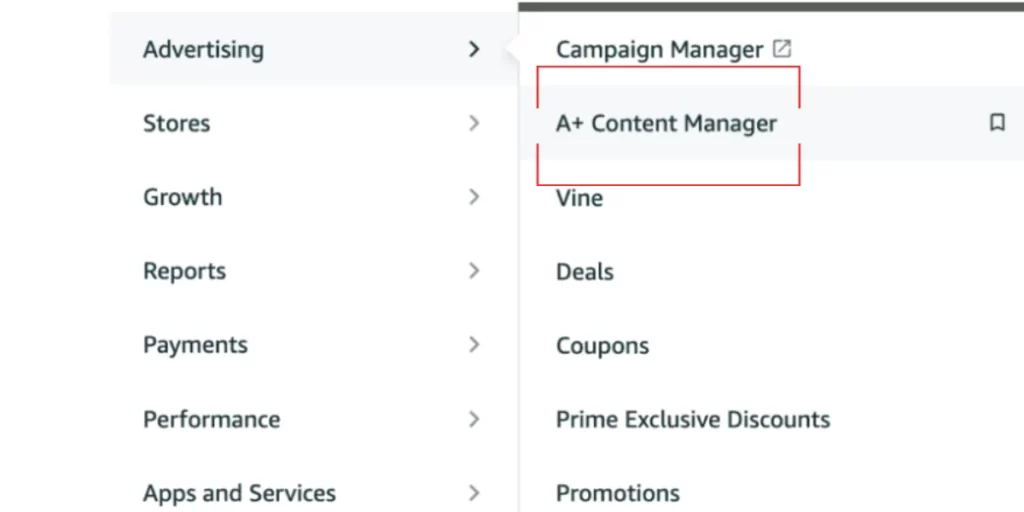
In Seller Central, individuals can find the A+ Content Manager by navigating to Advertising and hovering over it.
Step 2
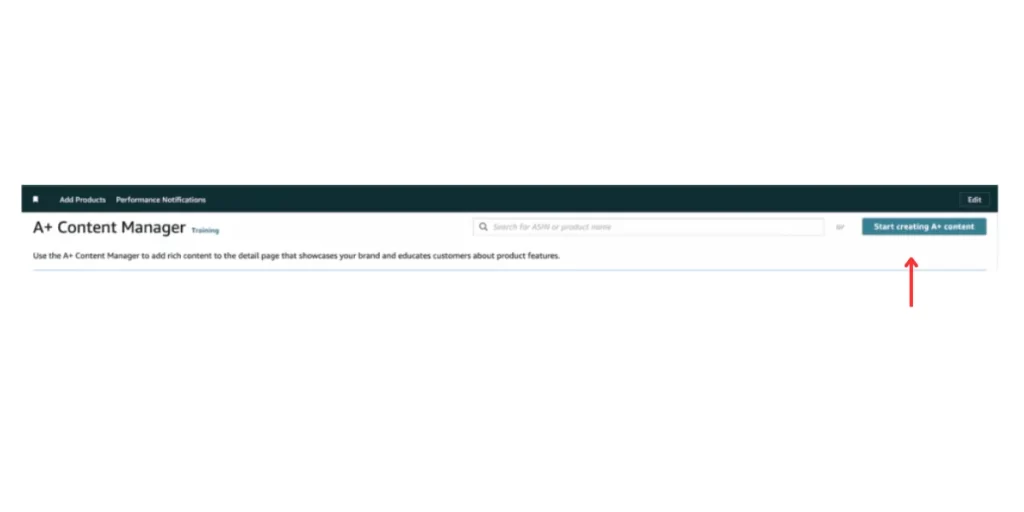
To begin creating A+ content, users should click the option ‘Start creating A+ content.
Once on the subsequent page, the user can pick the type of A+ content they wish to generate. Two options are available: a basic “Enhanced Product Description” or a compelling “Brand Story.”
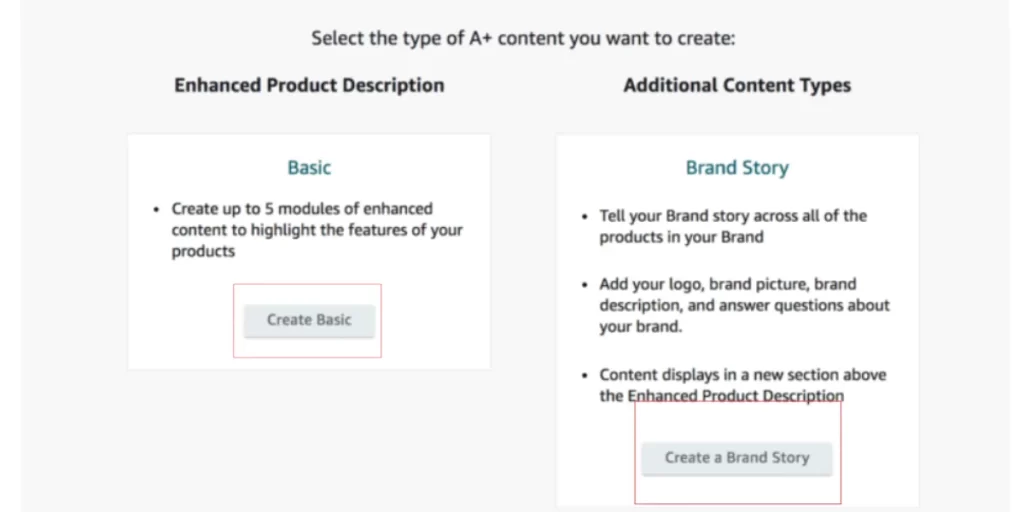
For those opting for the Basic enhanced content, Amazon includes up to 5 modules to enhance the A+ Content.
On the other hand, a Brand Story enables users to narrate their brand’s journey across all their products registered under the brand on Amazon. Notably, the Brand Story section will be positioned above the fundamental A+ Content, providing a prominent showcase for the brand narrative.
Step 3
Include the content’s title and language. Then, select ‘Add Module’.
Step 4
Users are allowed to include up to seven modules for their A+ content. The preferred layout includes:
- Logo Module: Display your brand’s logo 600 x 180 Pixels.
- Image Header With Text Module: Show a large 970 x 600-pixel brand or product image with optional text.
- Standard Image & Dark Text Overlay Module: Create a 970 x 300-pixel banner with optional text.
- Standard Single Image & Specs Detail Module: Include a 300 x 300-pixel image with essential product info.
- Standard Single Left Image Modules: Use two of these to highlight main product features with images and text.
- Standard Three Images & Text Module: Elaborate on additional product features or benefits.
Step 5
Submit an application for ASIN(s) on Amazon.
Step 6
To get approval, one should review and submit their content. Before crafting any text, checking Amazon’s A+ Content Guidelines is essential to avoid breaking any rules. When working with images, it’s crucial to consider their sizes:
- Logo: 600 x 180 Pixels
- Banner: 970 x 300 Pixels
- Comparison Chart: 150 x 300 Pixels
- Four-Image & Text Module: 220 x 220 Pixels
- Four-Image Quadrant: 135 x 135 Pixels
- All others: 300 x 300 Pixels
After deciding which ASIN(s) the A+ page should be associated with, submission for approval is the final step.
Amazon A+ Content Restrictions
In Amazon A+ content, specific copy guidelines should be followed to avoid potential issues. Here’s a quick summary of what’s not allowed:
- Avoid mentioning seller authorizations, like claiming authenticity.
- Refrain from including warranties, satisfaction guarantees, or references to off-Amazon refunds and returns.
- Stay away from promotional pricing terms such as “cheap,” “free,” or “affordable,” and avoid language that pushes shoppers to make immediate purchases.
- Skip exact shipping details like “free shipping.”
- Don’t use copyright, trademark, or registered symbols.
- Steer clear of boastful language, such as claiming to be the “#1 product on the market.”
- Avoid time-sensitive language that creates urgency, like “on sale for a limited time.”
- Limit third-party quotes to no more than two, and ensure they come from known public figures or reputable publications.
- Refrain from discussing product awards without proper references or disclaimers.
- Do not include links or language directing shoppers to other sites; avoid adding customer service phone numbers.
- Be cautious about using all-caps text or punctuation errors in your content.
How to Optimize Amazon A+ Content?
Typically, individuals consider keywords when optimizing a listing. Nevertheless, A+ content operates with a slight variation in how keywords function. The discussion will now explore the methods for optimizing Amazon A+ content.
1. Identify Buyers Persona
It’s recommended to conduct a market research. Understand who your customers are, why they need your product, and what encourages purchasing decisions.
Structure your content to address your buyer’s journey’s awareness, consideration, and transactional phase.
2. Explore a WOW Factor in your Product
You must identify the Unique Selling Proposition in your product. It could be a particular problem-solving. You may have cracked the most reliable built-quality.
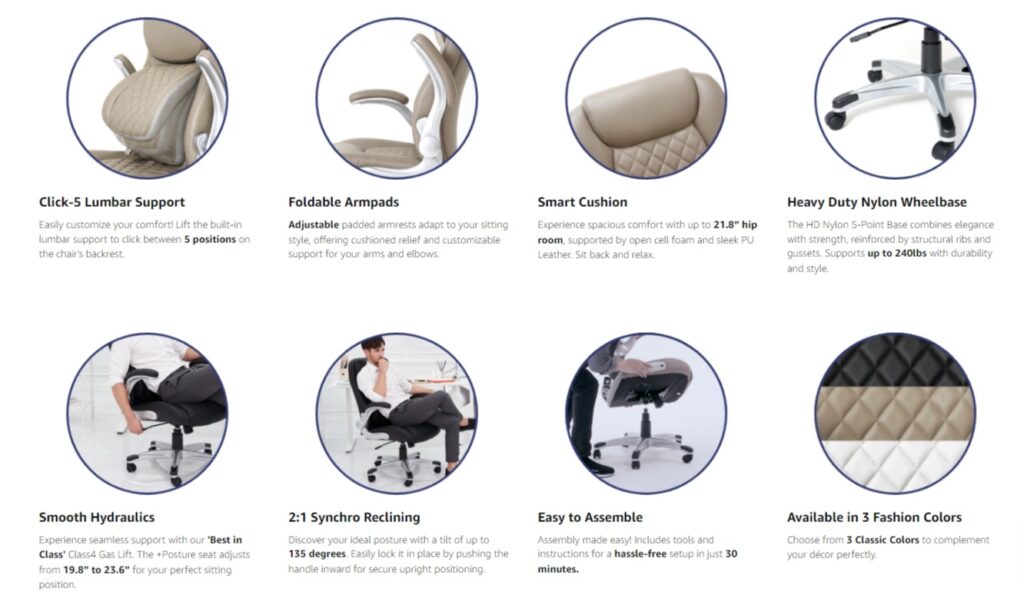
For example, if you’re selling a chair for sciatica, find out the pinpoints of patients struggling with this disease. It could be lumber support, high-back, flexibility & movement, or your chair has recline functionality missed by competitors.
- Focus on Benefits: List the features of your product, but focus on how these features benefit the user. Use bullet points for clarity.
- Use High-Quality Images: Include high-resolution images that showcase your product in use. Images should complement the text, showing the benefits and features mentioned.
Outline the major decision factors in media, and BOOM!
Doing a thorough competitor analysis can also help you! Find an example below:
3. Optimize for Search
Integrate relevant keywords naturally into your content to improve search visibility on Amazon and search engines.
Use specific terms that potential customers might use to search for your product or its features.
Integrate your keywords strategy into A+ content. Place your keywords smartly to improve organic search traffic via Amazon and Google.
Research seed, LSI, and NLP terms for your product using Keyword research tools like Helium10, etc. Here is the checklist:
- Place keywords in your product title, description, list, etc.
- Use your keywords as images and infographics ALT.
- Use keyword + problem use case as text in your infographics.
- Use NLP & semantic terms.
- Create FAQs focused on customer queries and smartly place your question-keywords.
3. Incorporate Lifestyle and Usage Images
Avoid using generic media, i.e., pictures, infographics, and videos.
Your product pictures are pivotal before a customer decides to buy or navigate from it.
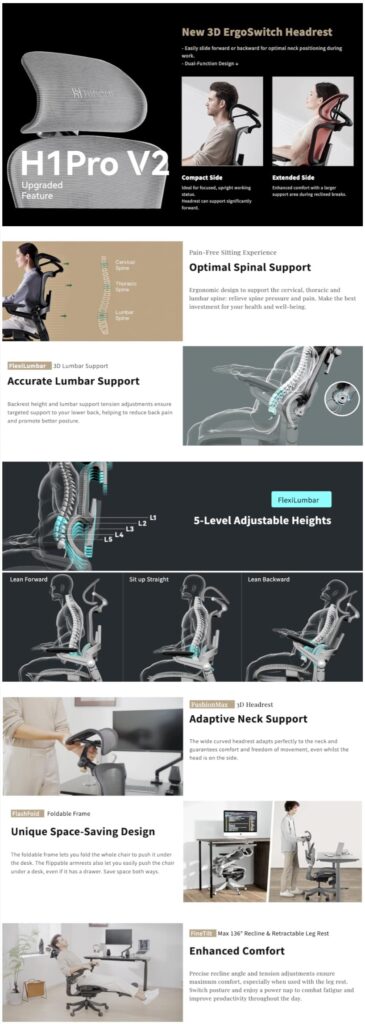
Show products in context: Use lifestyle images to show your product’s use in its intended environment, helping customers visualize its use in their daily lives.
Include close-up shots to highlight the quality and unique features of your product.
4. Include Customer Testimonials
Embedding customer testimonials or highlighting positive reviews within your A+ Content can significantly influence buying decisions.
5. Provide Clear and Concise Information
While it’s tempting to include as much information as possible, focus on the most important selling points to avoid overwhelming your audience.
Ensure your content is easy to read and understand. Avoid jargon unless it’s commonly understood by your target audience. Make it more scannable!
6. Leverage Enhanced Brand Content
Use the additional space to tell your brand’s story, showcasing what sets you apart from competitors.
Include comparison charts to highlight the differences between various products you offer, guiding customers to higher-priced items.

Ensure your A+ Content aligns with your brand’s visual identity and tone of voice. Consistency helps build brand recognition and trust.
7. Include a Clear Call to Action (CTA)
Encourage customers to take action, whether it’s making a purchase, learning more about your product, or visiting your brand store.
Testing Your Results
Selling on Amazon involves trying out various strategies to find the most effective approach for your products. After creating appealing images and persuasive product descriptions, the next step is to evaluate the success of your A+ Content. Here’s how:
1. Monitor Your Unit Session Percentage And Sessions
- Calculate your ‘Unit Session Percentage’ by dividing units sold by the number of sessions.
- Keep track of these numbers for 2-4 weeks to gauge your progress.
2. Conduct A/B Tests On Different Layouts, Text, And Images
- A/B testing is crucial on Amazon, as what works for one product may not work for another.
- Experiment with various layouts or images if you are still waiting to see improvement within a month.
3. Manage Your Experiments Beta Tool By Amazon
This tool simplifies A/B testing for A+ content pages. Currently, in beta, it’s only available to selected sellers meeting specific criteria:
- Own a brand
- Have high-traffic ASINs
- Have published A+ content on those ASINs.
This tool is designed to help eligible sellers optimize their A+ content through data-driven experiments, ultimately improving the performance of their product listings on Amazon.
Benefits of A+ Content on Amazon
Offers several benefits to sellers and vendors on the Amazon platform:
- Improved Product Listings: A+ Content allows sellers to enhance their product listings by incorporating multimedia elements such as images, videos, and comparison charts. This can make the listings more visually appealing and engaging for potential customers.
- Increased Conversion Rates: With the ability to showcase product features and benefits more effectively, A+ Content can lead to higher conversion rates. Engaging and informative content can help customers make informed purchase decisions.
- Enhanced Brand Identity: A+ Content enables brands to tell their story and showcase their unique identity. This helps in building trust and loyalty among customers and can lead to better brand recognition.
- Reduced Returns: When customers have a clear understanding of a product’s features and benefits, they are less likely to return items due to mismatched expectations. This can result in cost savings for sellers and vendors.
- Improved SEO: Including relevant keywords and content in A+ Content can positively impact the product’s search engine optimization (SEO). This can lead to better visibility in Amazon search results and potentially more organic traffic.
- Competitive Advantage: A+ Content can set your product listings apart from competitors, especially if your competitors have not invested in creating enhanced content. This can give your products a competitive edge in the marketplace.
- Cross-Selling Opportunities: Sellers can use A+ Content to cross-sell related products or accessories, increasing the average order value.
FAQs
Is Amazon A+ Content Optimized for Mobile?
No, A+ Content is solely optimized for desktops. However, before uploading your A+ content modules, see how they appear on a mobile device.
Can You Have a Video in A+ Content?
According to the most recent information, videos are prohibited under Basic A+ Content on Amazon. Video modules are available only in Premium A+ content. You may instead include a video in your Amazon listing to overcome this limitation.
Does Amazon index Amazon A+ Content?
Yes, Amazon’s search engines index A+ content. While the primary goal is to improve the customer experience, the content may indirectly influence search results by increasing conversion rates.
Can You Use a Third-Party Tool to Design A+ Content?
Yes, you can use third-party tools to develop your A+ content. Adobe Photoshop and Canva are two regularly used programs. You may also utilize AI to build your content.
Conclusion
To succeed with A+ Content, they must approach it carefully, follow guidelines, and keep improving through strategies like A/B testing. Amazon A+ Content allows sellers to highlight their products and build a brand story that connects with customers.
